
Blog
6.10.2026
Onecom launches landmark update to Vox voice platform
Onecom launches landmark update to Vox voice platform - protecting businesses from deepfake fraud and providing vital productivity insights
Read more

Action Required: Archive Scheduler Update
As part of the Version 6 upgrade, changes are being made to the Archive Scheduler.
All customers using the Archive Scheduler must complete the required update activities by following the instructions below.
Failure to complete these actions may impact scheduled archive processes following the platform upgrade.

Upgrading Archive Client from V5.4 to V6
Follow these steps to upgrade your Archive Scheduler client to V6:
Step 1: Download the Client
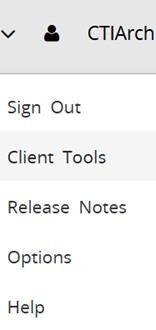
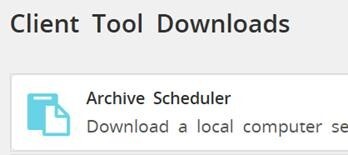
Step 2: Run the Installer
Step 3: Verify Settings and Connection